Zoom Phone Reporting Gaps and How They are Solved
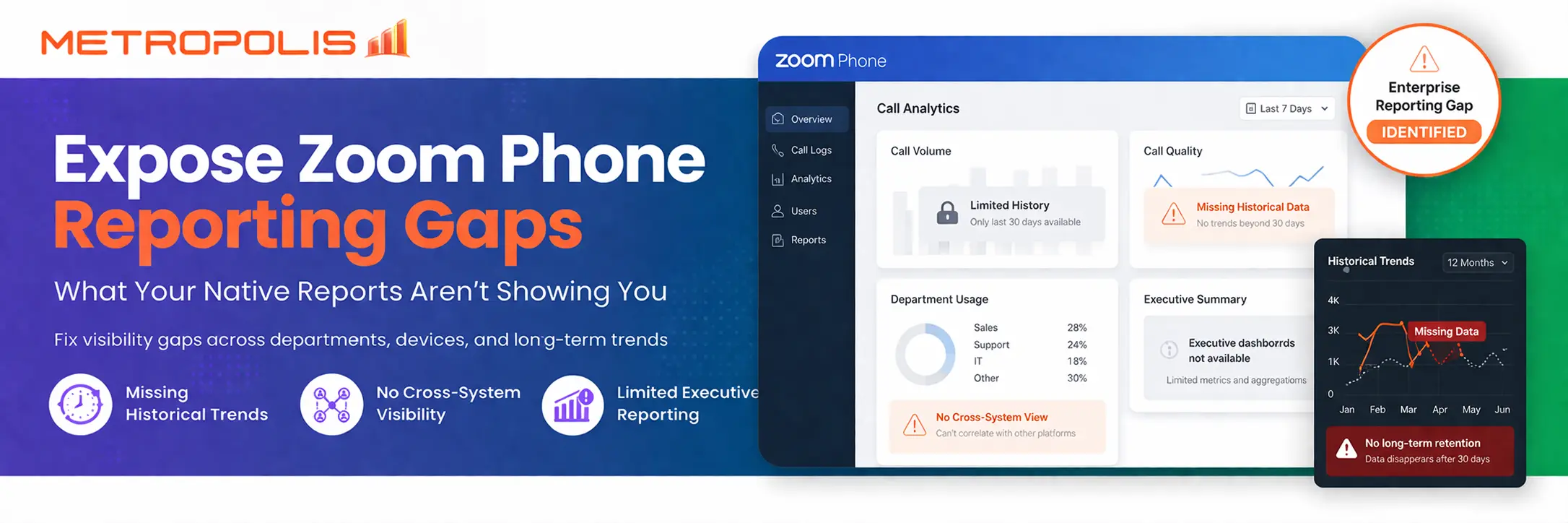
Enterprise adoption of Zoom Phone has accelerated rapidly in the least couple of years, especially for hybrid environments. While the built-in reporting is more than adequate for most IT teams during initial deployment, as usage scales across departments, and sites, reporting limitations evolve from minor inconveniences into significant strategic compliance and opportunity risks.
What Native Zoom Phone Reports Include
The native Zoom Admin Portal offers a functional baseline for daily operations. Admins can access Zoom Phone call logs to view real-time activity and individual user history. These logs typically include the caller ID, duration, and basic call direction (inbound/outbound).
Additionally, the platform provides Zoom Phone call statistics which allow admins to monitor MOS (Mean Opinion Score) and network performance. This is excellent for diagnosing a single "bad call" experience but is designed for tactical troubleshooting rather than long-term strategic planning.
Where Native Reporting Falls Short
As organizations mature, they often hit a "data ceiling." Native Zoom Phone usage analysis is frequently limited by:
Retention Windows: Many logs are purged after standard intervals, making year-over-year comparisons impossible.
Siloed Data: If you are comparing Zoom Phone vs Zoom Contact Center, you'll find the reporting models are fundamentally different—one is session-based, the other interaction-based.
Lack of Metadata: Native reports don't know your internal HR department codes or office cost centers.
Operational Problems Created by These Gaps
1Limited Historical Retention
While Zoom Phone provides historical call logs and usage reports, many enterprises require multi-year retention for trend comparisons across fiscal cycles, longitudinal capacity planning, and audit defensibility beyond default retention windows. Finance, legal, and compliance stakeholders often require retention policies that exceed native platform storage settings.
How to Solve it: Mature organizations schedule automated CDR exports via API and store records in a centralized data warehouse. This allows them to normalize timestamps and user metadata while applying internal retention governance policies, transforming operational data into a defensible compliance archive.
2No Native Cross-System Reporting
Many enterprises operate hybrid environments, featuring Zoom Phone in newer offices alongside legacy PBX systems in acquired sites or SBC-based routing in specific regions. Zoom Phone reporting is natively siloed to Zoom-originated calls and does not consolidate legacy PBX or gateway-originated call activity.
How to Solve it:Organizations implement centralized CDR aggregation platforms with multi-vendor ingestion pipelines. By normalizing data from all sources into BI dashboards, they create a single source of truth for enterprise telephony activity.
3Limited Cost Allocation
Finance teams frequently request cost breakdowns per department or location, PSTN usage analysis, and complex chargeback modeling. While Zoom Phone provides usage data, it does not automatically map organizational hierarchies found in ERP systems..
How to Solve it:Teams map extensions to HRIS department codes and enrich CDR exports with cost center metadata. By calculating dial patterns and toll classifications, they create automated monthly chargeback reports that convert raw logs into financial intelligence.
4Inconsistent Dashboards
Zoom Phone dashboards are primarily designed for administrators. Executives, however, require monthly usage trends, growth patterns by site, DID utilization, and missed call heatmaps. The native interface is operationally useful but is not always executive-ready.
How to Solve it: Zoom CDR data is exported into BI tools such as Power BI or Tableau. This allows IT teams to build summarized dashboards, automate executive PDF delivery, and align metrics with corporate KPIs, bridging the gap between operations and strategy.
5Limited Device Analytics
Zoom Phone supports multiple endpoints, including desk phones, softphones, and shared devices. Native reporting shows call activity, but analyzing which hardware is truly utilized requires deeper correlation. Organizations need to know where hardware can be reduced or which sites rely solely on softphones.
How to Solve it: Enterprises combine device inventory exports with CDR correlation and registration logs. This active versus inactive extension analysis supports hardware optimization and significant cost reduction initiatives.
6Limited Call Path & Routing Visibilitys
When troubleshooting unexpected failures or auto receptionist behavior, admins often need more granular call path insight than summary logs provide. Understanding the exact routing misconfiguration often requires deep technical detail.
How to Solve it: IT teams implement SIP ladder capture tools and SBC log correlation. By tracking SIP response codes through detailed call leg analysis pipelines, they transform reactive troubleshooting into structured root cause analysis.
7Multi-Platform Data Silos
Enterprises frequently operate Zoom Phone for internal communications alongside Zoom Contact Center for customer service. Because reporting models differ—session-based for Phone and interaction-based for Contact Center—consolidating these requires intentional data normalization rather than simple dashboard stitching.
How to Solve it: Rather than simple dashboard stitching, mature teams export data from both platforms and normalize it into a central warehouse. This enables unified reporting while preserving the integrity of each platform's unique KPIs.
8Compliance Risks
Highly regulated industries require call detail defensibility, recording retention guarantees, and legal hold workflows. While Zoom provides logging, regulatory defensibility often requires additional controls like immutable logging systems and jurisdiction-based retention logic.
How to Solve it: Organizations deploy centralized archival storage and immutable logging systems. By enforcing retention policies and legal hold tagging workflows, they ensure telephony records meet strict regulatory standards.
9Limited Alerts
Native Zoom Phone reporting is largely historical. However, enterprises may require immediate alerts for sudden international call spikes, fraudulent dialing patterns, or toll bypass attempts to manage risk proactively.
How to Solve it: Mature teams create API-based polling scripts and threshold monitoring systems. Integrating these with a SIEM (Security Information and Event Management) platform converts passive reporting into proactive risk management.
10No Capacity Forecasting
Organizations expanding geographically need to anticipate DID block requirements and port capacity. Native reports show current usage but lack the predictive modeling needed to align telecom planning with corporate headcount growth and enterprise strategy.
How to Solve it: By tracking multi-month call volume trends and modeling growth curves, organizations can integrate telephony metrics into corporate forecasting and align with overall growth strategies.
Why Enterprises Consider External Analytics
This is why many enterprises implement centralized analytics platforms designed specifically for unified communications environments, extending Zoom Phone reporting into a scalable, enterprise-grade data architecture.
To turn raw data into "Financial Intelligence," enterprises require Zoom Phone reporting solutions that exist outside the specific constraints of the UCaaS provider. External analytics platforms provide:
Data Normalization: Aligning call records from Zoom, Cisco, and Microsoft into one dashboard.
Enriched Context: Connecting CDR (Call Detail Records) to Active Directory or HRIS systems for automatic department mapping.
Proactive Alerting: Detecting fraud or toll-bypass in real-time rather than finding it in next month's bill.
Data Ingestion → Normalization → Enrichment → Visualization
This architecture is commonly used by enterprise IT teams to transform raw call data into actionable business intelligence.
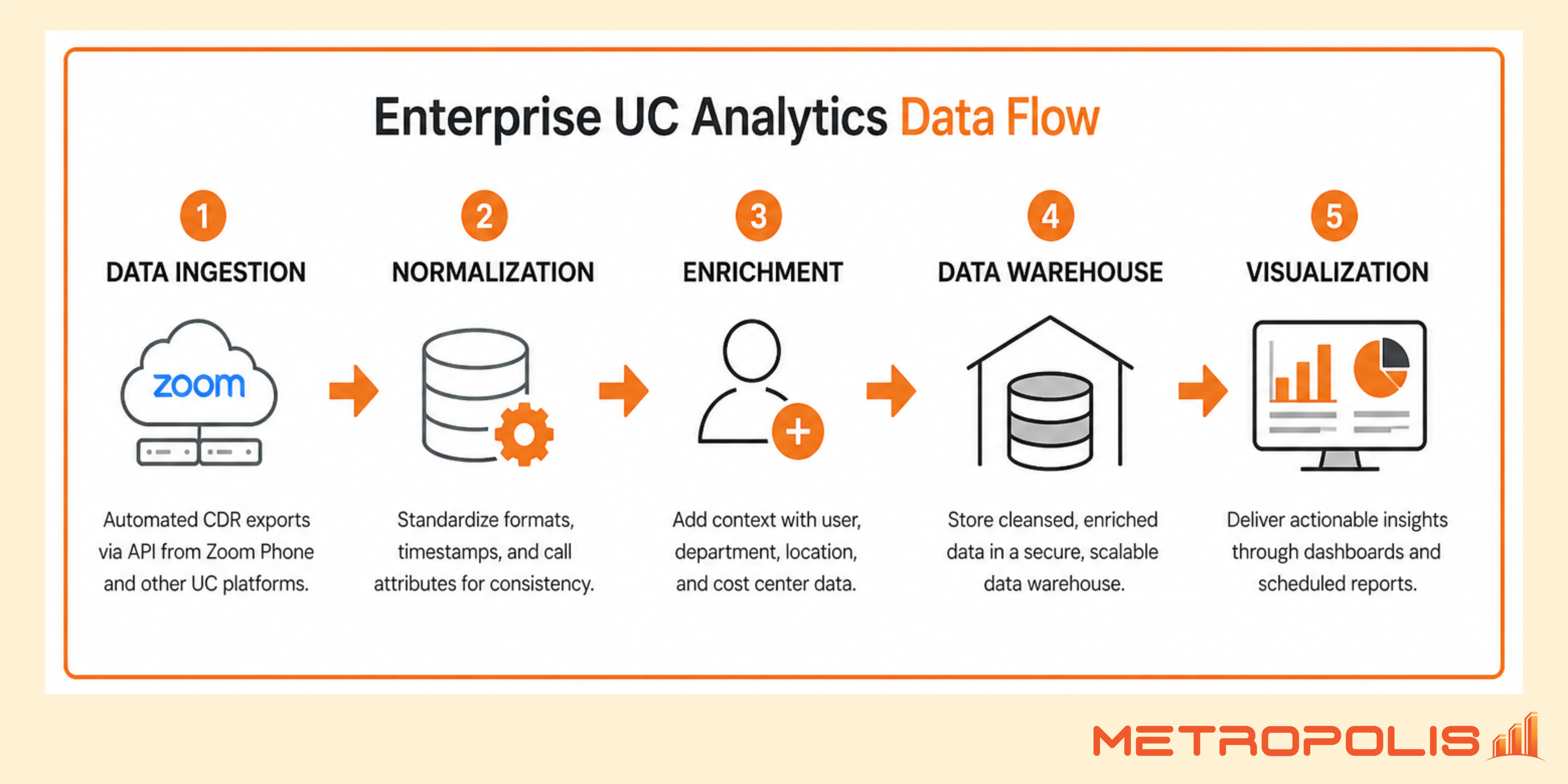
By automating Zoom CDR exports via API into a centralized data warehouse, IT teams can build summarized dashboards in Power BI or Tableau. This bridges the gap between technical operations and executive strategy, ensuring that telephony metrics align with corporate KPIs.
When to Enhance Your Zoom Phone Reporting Strategy
You likely need an expanded reporting architecture if:
You operate across multiple sites or maintain hybrid environments
Finance requires department-level chargebacks and cost allocation
Legal or compliance mandates extended data retention
Executives need consolidated, automated dashboards
You run both Zoom Phone and Zoom Contact Center
If any of these apply, it is time to evaluate an advanced Zoom Phone reporting strategy designed for enterprise scale.
