How to Configure Hunt Pilot, List, and Line Groups in CUCM
What is a Cisco Hunt Group? A Hunt Group is a CUCM feature that allows a single dialed number (the Hunt Pilot) to be distributed across a group of users (Line Groups). This ensures that incoming calls are answered by the next available representative, reducing abandoned calls and improving customer service efficiency.
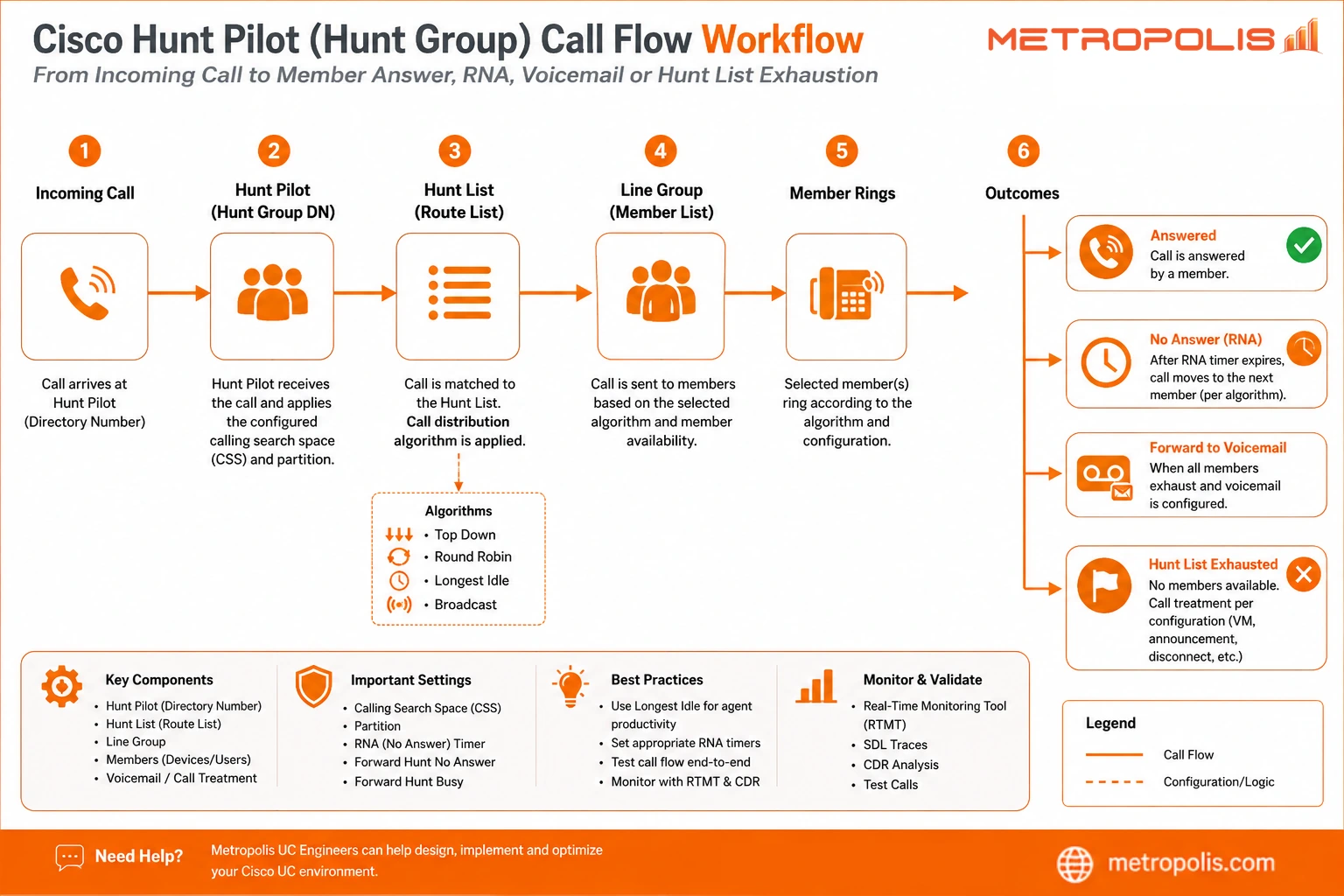
To configure a CUCM hunt group correctly, you must build the components in a specific order. This "bottom-up" approach ensures that each element is available to be selected by the next layer: Line Group → Hunt List → Hunt Pilot.
Below is a concise, step‑by‑step guide for UC engineers and IT administrators to deploy hunt groups effectively.
Common Hunt Pilot Misconfigurations
Before you get started, here are a few of the biggest problems I've seen UC Engineers deal with when setting up their Hunt Pilots.
Incorrect CSS on Hunt Pilots preventing member reachability
RNA timers shorter than endpoint ring timers
Broadcast algorithms causing duplicate mobile client alerts
Line Group member ordering conflicting with expected escalation paths
Voicemail forwarding loops caused by incorrect Forward Hunt Busy configuration
Perhaps the biggest mistake I've seen, however, is using Hunt Groups when you really need Cisco UCCX.
When to use UCCX instead of Hunt Pilots
Whenever queueing is required
When an SLA needs to be reported on
When you require agent skill routing
Whenever callbacks are necessary
Already have your hunt pilots set up in Cisco UCM but are looking for post-call troubleshooting, CDR analysis, and reconstructing hunt routing behavior after calls are complete? See our guide on Cisco Hunt Group CDR Routing Logic.
Getting Started with Hunt Pilots:
Step 1) Create the Line Group
A Line Group is the foundational layer. It contains the list of directory numbers (DNs) that will ring and the specific algorithm CUCM uses to distribute calls among them.
In Cisco Unified CM Administration, navigate to Call Routing > Route/Hunt > Line Group.
Click Add New.
Enter a Line Group Name and description.
Choose a Distribution Algorithm:
Top Down: Always starts with the first idle person in the list.
Circular: Distributes calls to the next person in the sequence after the last person who answered.
Longest Idle Time: Directs calls to the user who has been off the phone the longest.
Broadcast: Rings everyone in the group simultaneously.
In the Line Group Members section, add the DNs.
Configure Hunt Options for No Answer, Busy, and Not Available conditions, including Ring No Answer (RNA) timers.
Click Save.
Step 2) Build the Hunt List
A Hunt List acts as a container for your Line Groups. It defines the prioritized path CUCM follows if a specific group of people is unavailable.
Navigate to Call Routing > Route/Hunt > Hunt List.
Click Add New.
Enter a Name and select the Cisco Unified Communications Manager Group for registration.
Check Enable this Hunt List.
Check For Voice Mail Usage only if this is intended for a voicemail pilot.
Click Save.
Once saved, click Add Line Group and select the group created in Step 1. You can add multiple Line Groups to create multi-tier overflow logic.
Click Save again.
Step 3) Configure the Hunt Pilot
The Hunt Pilot is the entry point—the actual extension or "trigger" number that users dial to reach the hunt group.
Navigate to Call Routing > Route/Hunt > Hunt Pilot.
Click Add New.
Enter the Hunt Pilot Number or Pattern and assign a Route Partition.
Select the Hunt List you created in Step 2.
Set the Calling Search Space (CSS) to ensure the pilot can reach the internal DNs.
Configure Hunt Forward Settings. This defines the "final destination" (e.g., an operator or voicemail) if no one in any line group answers.
Click Save.
Streamline Your Hunt Group Troubleshooting
Configuring hunt groups is only half the battle. Monitoring their performance and identifying why calls are failing requires deep visibility.
Expo XT for Cisco UCM helps you visualize the entire hunt group journey. It identifies bottlenecks in your distribution algorithms, spots "ring-no-answer" trends, and provides automated reporting on agent performance.
Explore Expo XT for Cisco UCM


