
By Steve Burr l Metropolis Corp
If you ask a cloud vendor about migrating off Avaya Cloud Contact Center (ACCaaS) to another platform, they'll treat it like a legacy Avaya Call Management System (CMS) migration, telling you it's a seamless lift-and-shift and assure you that all your KPIs and SLAs will map over on day one.
As a UC engineer who has spent decades in the trenches with Avaya Aura Communication Manager and CMS, I can tell you the reality is far more complex.
When you dig into the mechanics of a migration, you realize that Avaya CMS is a remarkably granular analytics system. It tracks agent physics and telemetry in ways modern Cloud Contact Center as a Service (CCaaS) platforms simply don't replicate out of the box. If you don't map these technical nuances before cutting over, you won't just experience minor reporting discrepancies; you'll break transfer tracking, lose years of trend data, and blind your operations team to key agent behaviors.
Here is what you actually need to know to navigate an Avaya migration without destroying your historical call center analytics or losing critical reporting capabilities.
Avaya CMS tracks state transitions down to the hardware level. Cloud platforms abstract much of this away, collapsing distinct agent states into broad categories. Before migrating, you need to understand which proprietary Avaya fields your contact center managers rely on today.
This is the single biggest reporting trap in an Avaya migration. Avaya CMS tracks two distinct ring duration metrics:
I_RINGTIME (Agent Ring Time): Measures the time a call spends actively ringing at an agent's station while the agent is in an eligible state. Crucially, if the agent changes work modes, goes unavailable, or lets the call time out instead of answering, I_RINGTIME stops accumulating for that agent.
RINGTIME (Caller Ring Time): Measures the total duration the caller spends hearing a ring back before being answered, abandoned, or redirected, independent of what the individual agent does.
Most cloud contact center platforms collapse these into a single, caller-side ring time metric.
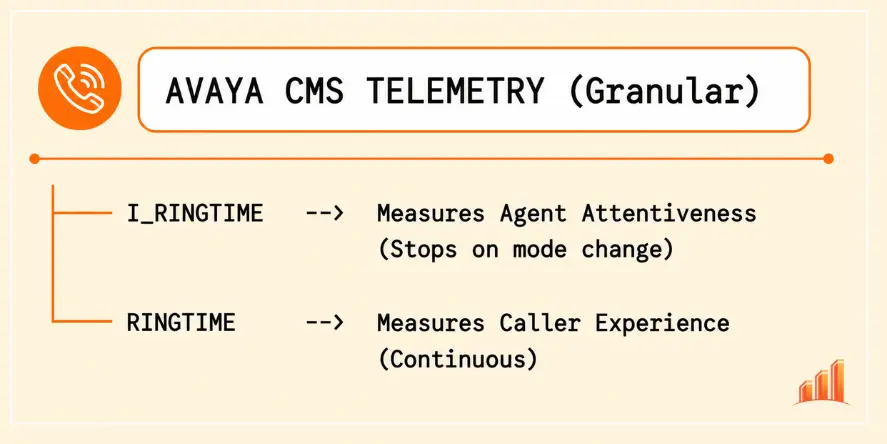
Why this breaks operations: Contact Center Managers frequently use I_RINGTIME to flag agent call-avoidance or multi-tasking bottlenecks. If an agent lets a call ring while hanging out in an unassigned state, I_RINGTIME exposes it. On a CCaaS platform tracking only caller-side ring time, that behavior becomes invisible.
How does your organization measure internal collaboration versus work avoidance? Avaya CMS splits internal (extension) call time across specific agent work states:
I_ACWINTIME: Inbound extension talk time while in After Call Work.
I_AUXINTIME: Inbound extension talk time while in AUX (Auxiliary) state.
I_ACWOUTTIME: Outbound extension talk time while in ACW.
I_AUXOUTTIME: Outbound extension talk time while in AUX.
Modern platforms aggregate all internal calls into a generic "Internal Talk Time" metric. You lose the ability to see whether an agent is taking internal support calls to resolve a customer issue (I_ACWINTIME) or chatting with peers while parked in an unallocated state (I_AUXINTIME).
If your system relies on External Call History (ECH) with Special Application SA8702 ("Copy UCID for Station Conference/Transfer") enabled, Avaya writes a persistent Universal Call ID (UCID) across every leg of a multi-party call chain.
Furthermore, ECH tracks consulttime—the exact duration an agent spends talking on an outbound leg while holding a customer in AUX, ACW, or OTHER state. This gives you exact data on warm transfers, supervisor consults, and conference setups.
The migration risk: If your system currently uses standard Unformatted or Enhanced Unformatted CDR feeds rather than ECH, UCID is absent, meaning multi-leg conference and transfer reporting is already broken. When moving to the cloud, most platforms report queue-to-queue transfers rather than agent-initiated handoffs, leaving engineers unable to recreate historic transfer chain analytics.
When evaluating destination platforms, take vendor parity promises with a grain of salt. Here is how the major cloud platforms handle Avaya's native telemetry:
| Reporting Feature / Telemetry | Avaya CMS (Native) | Cisco Webex Contact Center | Genesys Cloud CX | NICE CXone |
|---|---|---|---|---|
| Agent vs. Caller Ringing | Distinct (I_RINGTIME vs RINGTIME) | Caller-side only | Caller-side / Ringing duration | Ringing duration |
| State-Based Extension Calls | Broken down by ACW/AUX | Generic internal call tracking | Generic internal call tracking | Mapped to broad user states |
| Consult Time Granularity | Dedicated consulttime in ECH | Folded into Hold / Talk | Mapped to Outbound / Hold | Folded into Hold / Talk |
| Transfer Handoff Tracking | Agent-initiated via UCID | Queue-to-queue primary | Queue-to-queue primary | Queue-to-queue primary |
| Historical Data Import | Decades in hagent, dagent, etc. | Starts fresh Day 1 | Requires external Data Warehouse | Archive export required |
Avaya CMS stores years of granular interval data in its internal database across hagent (hourly), dagent (daily), wagent (weekly), and magent (monthly) tables. Cloud platforms start fresh on Day One. They do not import native Avaya interval tables. If leadership expects year-over-year performance trends post-cutover, you must stand up an external data repository (like PostgreSQL or AWS Redshift) and stream your historical ECH data into it before decommissioning CMS.
During cutover, engineers frequently busy out CDR links (busyout cdr-link) or re-route network feeds. While Communication Manager has an internal CDR buffer to hold records while the link is down, it
is finite. Once that buffer fills during high-volume cutover testing, new Call Detail Records are permanently dropped.
Workaround: Keep CDR links active and parallel-feed both old and new collection points for 30 to 90 days post-migration. Reconcile records before severing the link.
Moving Avaya CMS Designer Reports from the legacy PC Client (Flash-based/thick client) to the CMS Web Client is notoriously clunky. When you run the migration utility, the original report isn't modified; instead, a web-compatible copy is generated. While the underlying SQL queries and inputs translate, the graphical layout and custom formatting frequently shatter. Plan for weeks of manual layout editing, and ensure report ownership is reassigned away from former employees before initiating the export.
Avaya CMS supports either Internal Call History (ICH) or External Call History (ECH)—never both concurrently. If your environment currently runs ICH, your detailed call records live entirely on the CMS local disk, constrained by the Number of Call Records system allocation. Once you cut over, querying those records directly becomes difficult. If you run ECH, your primary risk is losing the external collector pipeline during transition.
Avaya CMS credits the initiating agent when tracking transfers. Most CCaaS platforms credit the receiving queue or flow. If your supervisors evaluate agent efficiency based on transfer rate metrics, their reports will break unless you rebuild custom transfer logic using raw call-event streams in the new platform.
Before touching a single trunk or provisioning a cloud user, complete this technical audit on your Avaya environment:
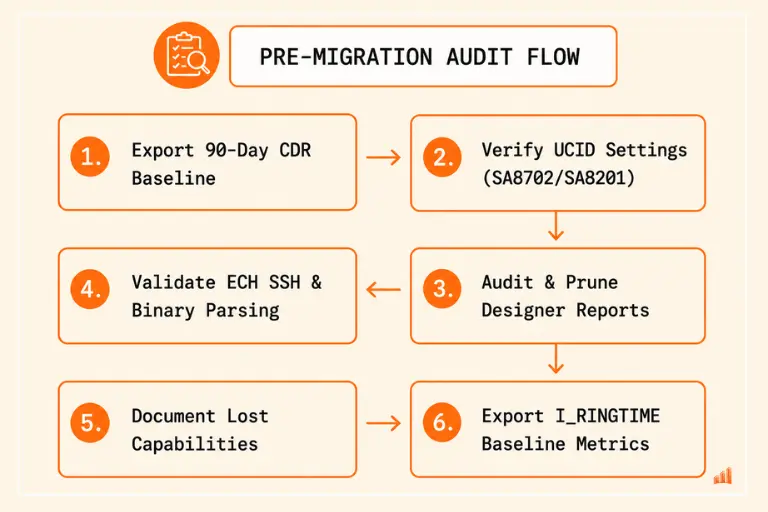
Export 90 days of CDR feeds via FTP/SFTP. Use this baseline to record peak concurrent session usage, verify hour-over-hour call totals, capture disposition codes, and calculate average call durations. You will need these numbers to validate the accuracy of your new CCaaS reporting engine.
Log into Communication Manager SAT and check your system parameters:
change system-parameters special-applicationsEnsure SA8201, SA8202, and SA8702 are set to y.
Then verify feature configuration:
change system-parameters features-related (Page 5)Ensure Copy UCID for Station Conference/Transfer is set to y.
Open the CMS Web Client migration utility and export your report inventory. Filter out orphaned reports owned by deactivated user accounts. Apply the 80/20 rule: Identify the top 20% of Designer Reports that drive executive decisions. Plan to manually rebuild those in the new platform's analytics suite; abandon the rest.
If you use External Call History, log into the CMS terminal as root or cms and execute:
cmssvc -> auth_displayConfirm that ECHI is authorized and running. Test host reachability and SSH key validity to your external collector:
ssh -l [username] -i /cms/dc/chr/echi.key external-server.company.comNote: ECH data files are formatted in raw binary structure. Ensure your parsing script or ETL pipeline successfully processes these binary stream files into readable SQL tables before cutting over.
Run interval reports on the hagent table for at least 30 days. Calculate the variance between I_RINGTIME and RINGTIME across your agent teams.
If you identify agents where I_RINGTIME is significantly lower than RINGTIME, document this discrepancy. Present this data to Call Center Managers early so they understand why post-migration agent responsiveness metrics will look different on a cloud platform.
To keep historical reporting intact without paying double licensing fees indefinitely, deploy a Hybrid Historical Data Architecture during your migration phase.
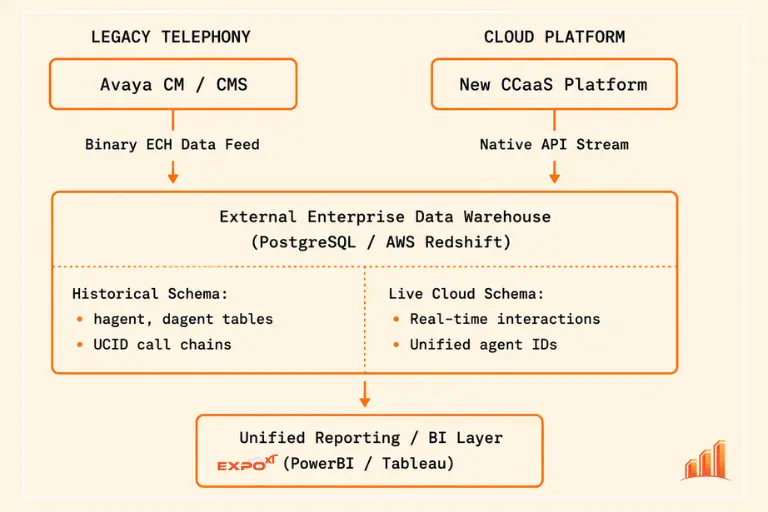
Maintain CMS as a Read-Only Node: Keep your Avaya CMS server online in a read-only state for 12 to 24 months post-migration. Do not attempt to import old Avaya database dumps directly into your cloud platform.
Stream ECH into an External Warehouse: Parse binary ECH files into a relational database (PostgreSQL, Snowflake, or Redshift).
Unify at the BI Layer: Map historical Avaya schemas (hagent, dagent) and new cloud platform event streams into a single Business Intelligence tool (e.g., PowerBI or Tableau). This allows management to run year-over-year trend analysis without losing historical continuity.
One overlooked challenge during an Avaya Contact Center migration is preserving historical Avaya call reporting. Native migration tools often focus on configuration and customer interaction continuity, but organizations still need access to historical call volumes, agent activity, queue performance, and compliance records.
Avaya CMS was built for an era where engineers demanded granular, hardware-level insight into every second of an agent's shift. Modern cloud platforms trade some of that low-level telemetry for flexibility and API integrations.
By auditing your special applications, setting realistic expectations around metrics like I_RINGTIME, and staging an external data warehouse for your ECH data, you can lead a migration that protects your organization's analytics and saves your engineering team months of post-cutover troubleshooting.
Ensure total telemetry retention, historical continuity, and multi-vendor analytics with Metropolis.
Try Expo XT UC Analytics


